The Command Line is Learning to Talk
For decades, the developer’s terminal has been a sanctum of raw, unfiltered power. It’s where code is compiled, servers are managed, and data is transformed. But that power has always come with a strict contract: you must speak its language fluently. grep, sed, git, ssh, these are not just commands; they are a precise, unforgiving syntax for manipulating a digital world.
The latest generation of official CLI tools from Google (Gemini) and Anthropic (Claude) represents a fundamental paradigm shift. The goal is no longer just to find the right command; it’s to perform sophisticated computation directly on the data and context within your shell.
It’s about piping a 10,000-line log file and asking, “Summarize the critical errors.”
It’s about feeding a git diff and saying, “Draft a conventional commit message for these changes.”
It’s about pointing to a directory and prompting, “Write a Python script to find all duplicate images in this folder.”
This is the real promise of AI in the command line: bringing the model’s reasoning engine to your data, right where it lives. It transforms the terminal from a place of pure instruction to a place of interactive dialogue.
The New Contenders: Gemini and Claude Enter the Shell
The world of shell-native AI was, for a long time, the domain of open-source passion projects and early-stage startups. But recently, two of the heaviest hitters in the AI landscape have made official, first-party entries into the space, signaling a major shift. This isn’t a niche anymore; it’s a new, legitimate category of developer tooling.
Google’s Gemini CLI: The Command Generator
Google’s answer to the AI-powered shell is the gemini command-line tool. While it’s a capable text processor, its standout feature is its powerful and safe command generation. It excels at translating natural language intent into precise, executable shell commands.
You install the tool, and your terminal is instantly upgraded. You can ask it a question in plain English, and it doesn’t just give you the answer; it gives you the command and asks for permission to run it.
For example, imagine you need to perform a quick audit on a large codebase.
$ gemini "recursively find all python files in this directory that contain the word 'deprecated' and count the number of lines in each"The tool thinks for a moment and then presents you with a clear plan:
I will run the following command:

find . -name "*.py" -exec grep -l "deprecated" {} \; | xargs wc -l

[y]es, [n]o, [e]dit: y
This interaction is simple but brilliant for three reasons:
-
It generates a complex, correct command that many would have to search for.
-
It explains what it’s about to do, which is a fantastic learning opportunity.
-
It includes a critical safety-latch. That
[y/n/e]prompt is the most important feature. It prevents the LLM from ever running a destructive command (rm -rf) without your explicit consent, building a necessary layer of trust.
Anthropic’s Claude CLI: The Text Processor
Anthropic takes a similar approach with its claude code CLI, but its DNA shines through in its exceptional ability to handle large volumes of text piped directly from other shell commands. While Gemini can do this too, Claude’s massive context windows and strong reasoning abilities make it a natural fit for tasks that involve summarizing, transforming, or explaining text-based data.
This is where the power of the shell’s pipe (|) operator truly comes alive. You can seamlessly connect the output of any standard command to the brain of Claude 3.
A classic example is generating a commit message from a git diff.
$ git diff | claude "based on the following diff, write a conventional commit message with a title and a descriptive body"Claude receives the entire diff as its context and, in seconds, provides a perfectly formatted summary of your changes.
feat: Refactor user authentication to use JWT

- Replaced the legacy session-based authentication system with JSON Web Tokens (JWT).
- Created a new `AuthService` class to handle token generation and validation, centralizing all auth logic.
- Updated the `/login` endpoint to return a JWT token upon successful login.
- Added a new middleware to protect routes by verifying the JWT in the Authorization header.
This transforms a tedious chore into a seamless, one-line command. It’s not just generating a command; it’s performing a complex reasoning task on data that never had to leave your terminal.
Both tools demonstrate that this is about more than just accessing a model; it’s about thoughtful integration into the core workflows of a developer’s daily life.
Under the Hood: The Anatomy of a CLI Agent
At first glance, you might assume these tools are just simple curl wrappers around a model’s API. The reality is far more profound. They are not just command generators; they are true software agents, running a continuous Reason -> Act loop with you, the developer, as the final approver.
This agentic architecture has three core components: a “Brain,” a set of “Hands,” and a “Conscience.”
The “Brain”: A Reasoning Engine with Tool-Calling Ability
The most critical concept to understand is that the LLM’s primary job isn’t to generate text; it’s to reason and decide which tool to use. When you give it a task, the model’s first output is often a structured JSON object requesting to call a function from its available toolbox. For a request like “write a python script to find duplicate images”, the model doesn’t just stream back code. It returns a specific function call:
{
  "tool_code": {
    "name": "write_file",
    "args": {
      "file_path": "find_duplicates.py",
      "content": "import os\\nimport hashlib\\n..."
    }
  }
}
This is the essence of modern agentic behavior. The LLM acts as the central orchestrator, deciding which tool to use and what arguments to pass to achieve your goal.
The “Hands”: A Toolbox of Local Functions
The agent comes equipped with a local “toolbox”—a set of concrete functions it can execute on your machine. This isn’t magic; these are functions written in the CLI’s own codebase (e.g., using Node.js’s fs module). This toolbox typically includes:
-
File System:-
glob: To discover files that match a pattern. -
read_file/read_many_files: To ingest the content of one or more files. -
search_file_content: To search for text inside files. -
write_file: To create a new file with specified content. -
replace: To perform find-and-replace operations within existing files.
-
-
Shell Execution:run_shell_command: To execute a standard shell command, which always requires the highest level of scrutiny.
-
Web Access:-
web_fetch: To retrieve content from a specific URL. -
google_web_search: To perform a general web search.
-
-
Memory:save_memory: To store facts for recall in later sessions.
checkout docs/tools directory for full list of the tools and documentation about them.
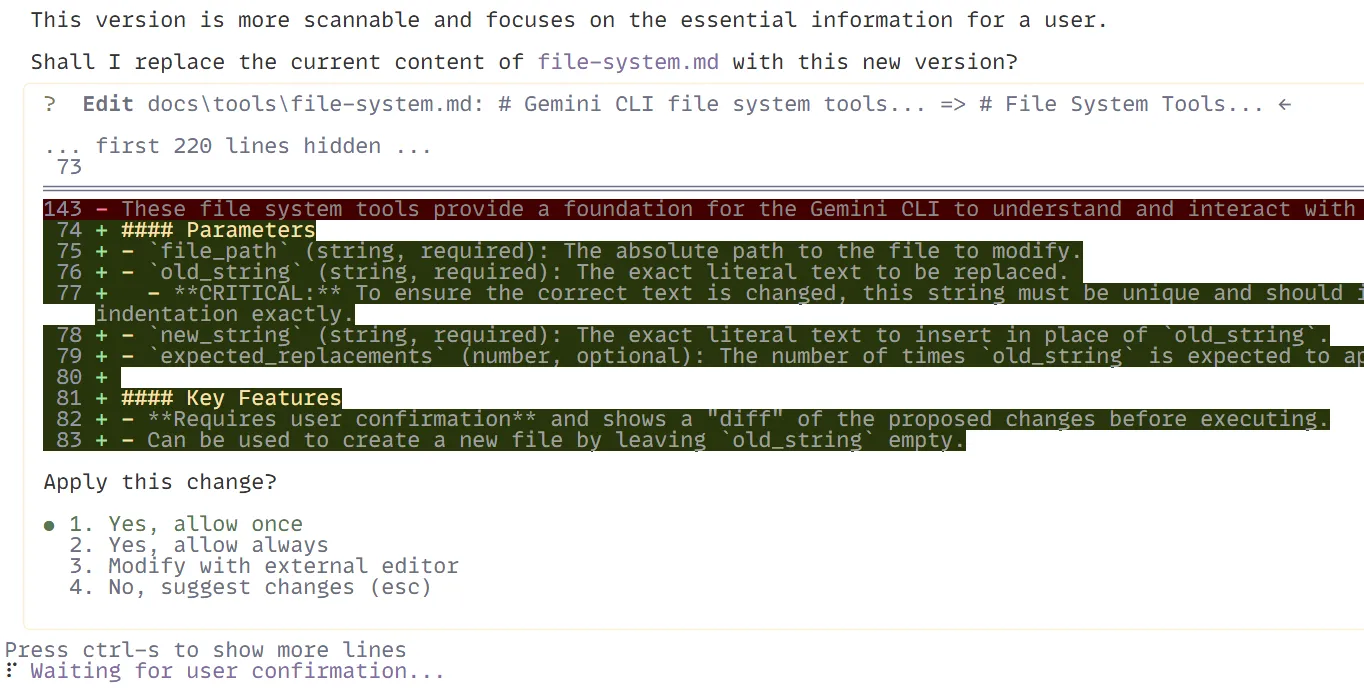
The “Conscience”: The Human-in-the-Loop Safety Latch
When the CLI’s core engine receives a tool_code request from the Brain, it doesn’t execute it immediately. It triggers the system’s conscience: the confirmation prompt. It presents the exact function and arguments to you and requires your explicit approval. It ensures you are always in control.
The Broader Ecosystem: From Official Tools to DIY Agents
While the official CLI tools from Google and Anthropic have brought new legitimacy and power to the space, they are part of a much larger, vibrant ecosystem. The idea of an AI-powered shell has been percolating for years in open-source projects and startups, each with a different philosophy on how to best merge AI with the command line.
The Integrated Experience: AI-Native Terminals
Instead of a bolt-on command you run in your shell, some companies are completely reimagining the terminal application itself. The most prominent example is Warp.
Warp is a modern, Rust-based terminal that bakes AI features into its very fabric. It’s not a separate agent you call; the AI is an ambient layer that’s always available. You can press a hotkey to trigger “Warp AI,” which can:
-
Translate natural language to shell commands, right in your input block.
-
Debug errors by automatically explaining why a command failed and suggesting a fix.
-
Create and share workflows, turning complex multi-step commands into reusable, parameterized scripts that can be shared with your team.
The experience is seamless. AI isn’t a context switch; it’s part of the core UI, offering a glimpse into a future where the terminal is inherently intelligent.
The Open-Source Pioneers: ShellGPT
Long before the official clients arrived, open-source projects were proving the concept. The most well-known is ShellGPT (often invoked as sgpt). It captured the imagination of developers by offering a simple, powerful, and highly flexible way to interact with LLMs from the terminal.
Its core strength is its un-opinionated nature. While the Gemini and Claude CLIs are tied to their respective models, sgpt can be configured to point at any OpenAI-compatible API. This means you can use it with OpenAI’s GPT-4, a self-hosted open-source model via a local server, or any number of other providers. This flexibility makes it a powerful and enduring tool for scripters and tinkerers.
The Ultimate Customization: The DIY Agent
For the engineer who wants ultimate control, privacy, and zero cost, the “Do-It-Yourself” route has become incredibly viable. The recipe is simple:
-
A Local Model Runner: Tools like Ollama have made it trivial to download and run powerful open-source models (like Llama 3, Phi-3, or Mistral) directly on your own machine.
-
A Simple Script: A few lines of Python or even a Bash script can be used to wrap the
ollamacommand. The script takes your command-line arguments, formats them into a system prompt, makes an API call to the local Ollama server, and prints the response.
The Future: Towards the Conversational Operating System
The current crop of CLI agents, impressive as they are, point toward a far more profound endgame. The evolution from single-command helpers to multi-step agents that can plan and execute complex tasks is not just about developer productivity; it’s a stepping stone toward a new computing paradigm. This is the path to what tech writer Greg Twemlow calls the “Rise of the Conversational Operating System.”
The logical conclusion of this trend is a future where the command-line prompt is no longer a place where you type syntactically perfect instructions for distinct applications (git, docker, kubectl). Instead, the shell itself becomes the universal interface to the OS. You state your high-level intent, “Deploy the latest version of the web-app to staging,” or “Find the service listening on port 3000 and analyze its recent error logs”, and the conversational OS orchestrates the necessary sequence of tools, API calls, and system commands to achieve it. In this world, the AI doesn’t just help you use the command line; the AI is the command line, acting as the ultimate translator between human intent and machine execution.
If you haven’t yet, it’s time to explore this new class of tool. Pick one, install it, and integrate it into your workflow. The command line is learning to talk, and it’s time to join the conversation.